

Friday, November 28, 2014
How to block websites in your Computer without any Software

Wednesday, July 16, 2014
How to Download Facebook Photo Album in a Single click

Hello guys! In today's post, i'll tell you a useful facebook trick which will save your precious time in getting all yours or your friend's facebook uploaded pics on your computer in just a single click. If you want to download each and every pics or photo albums which you have uploaded onto your facebook account then it would take lots of your precious time if you start downloading the pics one by one. More probably you may miss some of your pics to download. So, in order to
Monday, July 14, 2014
How to change the Background of Facebook Login Screen

Are you fed up with the old look background of the facebook login screen? Do you want to see a new image of your choice when you log in to the facebook? If yes then this post would be interesting for you. We all know about facebook and about it's popularity nowadays. Whenever we log in to the facebook, every time we see an old background. But if you want to see or change the background of facebook according to your own choice then keep reading this post. Yes, we will teach you how to have a pic of yours
Sunday, July 13, 2014
How to Increase Internet speed without using Software

Hello friends! It has been a long time since we had a knowledgeable article on this blog. But the wait is over. Today, I'm here with a post which you really would like to read. Yes, I am going to tell you the easiest way to increase the speed of your internet and that's too without using a software. So, without wasting your time, i am going to
Sunday, February 16, 2014
How to play Missile game in You Tube

Saturday, February 15, 2014
How to receive text sms online for free

Monday, October 14, 2013
How to Disable Message seen option in Facebook chat

Saturday, October 12, 2013
How to Create and Add http 404 Error page in your Blog

A big hello to all my friends as i am posting after so much time. In today's post, i will tell the bloggers how to create and add the 404 error page into your blog in order to reduce the chances of your visitors to move on to some other websites. 404 error pages are the pages of your blogs which are taken down by the blogger or webmaster due to some reasons but their url still exists in the search engine. So when someone click on that link, he or she lands to a page where nothing is there. You can make it well designed and can put in your website's home page or other links to again redirect the important traffic back to your blog.
We all know the importance of the traffic for a blogger. So lets start with its procedure.
Tuesday, August 6, 2013
Monday, July 29, 2013
How to use Notepad as your personal Diary!

There are lots of uses of Notepad and i am going to share one of the uses here with you. Most of the people spend their lots of time on computer. So, I am gonna tell you how to use notepad as your personal diary. Yes, you can use it as a diary! There is no need to put the date everytime you write on your notepad diary. When you open it, the date and time will automatically be printed on the top of it and you just have to write what you wanna write and save it. Let's start with it.
Thursday, June 27, 2013
How to Add Additional Clocks in Windows

Sometimes,we have to find out the exact time of the country where our dear ones are living. At that time,everybody comes up with a single idea and that is to look up the time of that country through google. But, with this article, you can set the clock of any country in your computer and can see the time without even having the internet connection. So, let's start with it's procedure.
Tuesday, June 4, 2013
How to Hire Email id Absolutely free for 10 minutes

We all fed up with the spam messages we get into our email id inbox and this occur when we share our email id online with other websites for the purposes like filling up surveys, getting services of some websites etc. Today, i will tell you how to get rid of from these spams. With this article, you can hire an email id absolutely free for 10 minutes. You can also increase this time by 10 minutes more. So, let's start with its procedure.
Friday, May 17, 2013
How to shake You Tube website

Well this is not a big trick to learn but with this trick you can have fun with your friends. I will tell you how to make you tube website to do dance.
Also learn How to play missile game in You tube
1.) Go to Youtube.
2.) Type Do The Harlem Shake in the youtube search box and wait for some seconds to see the youtube website doing dance.
Friday, May 10, 2013
How to move your chatbox anywhere in facebook

Thursday, May 9, 2013
How to set password to a Folder using Winrar Software

There are various methods and softwares with the help of which you can protect your personal stuff from other users either by locking the folder or by hiding it. But most of us don't know that we can simply set password to a folder with the help of winrar software which is commonly used to compress and decompress the data and comes pre-installed in almost all of your laptops. If you don't have then you can download it from winrar. Now let's start how to set password for your folder by using this software.
Wednesday, May 8, 2013
How to make invisible folder and folder without any name

It is impossible to make a folder without any name. If you
try to make a folder without any name, it will make the folder of name New
folder. Before reading this article, just try to make a nameless folder and I
bet you won’t be able to do so. In this article, I will tell you a trick in
which you can make a nameless folder and can also make it invisible so that
nobody can see your personal stuff. In this way, you can hide your personal
data from others by making the folder invisible. So, let’s start how to do it.
Also see:- How to create a folder Locker without any software in Window 7
Also see:- How to create a folder Locker without any software in Window 7
Tuesday, May 7, 2013
How to change Windows 7 Home Basic into Genuine Windows 7 Ultimate within 10 minutes using serial key

Hello friends,Today I will tell you how to convert your old
fashioned windows home basic into upper
version of windows 7 i.e Windows Ultimate. I have just changed my home
basic window into ultimate by using a serial key which I am gonna share with
you.
Monday, May 6, 2013
How to Recover accidently deleted data or due to formatting of your computer

I am writing this article because 4 days earlier , I
mistakenly done factory reset to my computer and lost all my data i.e
pictures,documents,movies,videos,mp3 everything. There were important pics of
my family and friends which I really needed back. Then I search on the internet
and came with a software named as Recuva. This software brought me
approximately all the pics of mine which I had saved on my computer before
factory reset. I didn’t try for other things like mp3,videos,movies etc
so I am not sure about that.
Sunday, May 5, 2013
How to make a new Partition of Hard disk on your Laptop
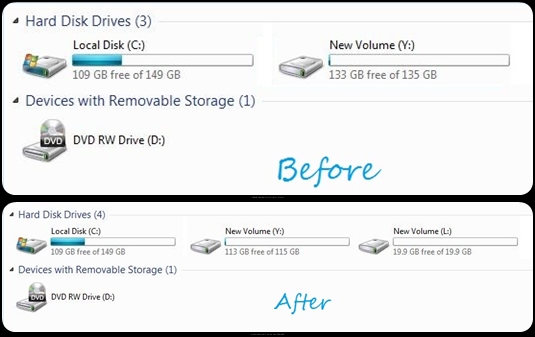
Here, we will learn
how to make a new partition on the hard disk. It is possible only if you have
unallocated space on your hard disk or if there is enough space in one of your pre-partitions
of hard drives to create another partition i.e shrinkage of volume is possible. You can create a new partition for the data related to your family and can hide the new partition from the other users. So, let’s start with its
procedure.
Sunday, April 28, 2013
How to Create Signature and Add it into your Blog

Hello friends, here is another article for you. In this
article we will learn how to create signature of yours and how to add it into
your blog to give your blog a classy and stylish look. You might have seen that
some bloggers finish their blog post with the end of their signature which
makes their blog more beautiful. Some use the signature at the end of every
blog post or some use it just at a single place in their blog. It’s your own
choice where you want to show your signature in your blog. You can also connect
a link with your signature means when somebody will click on your signature, it
will lead to the user to that particular link. So let’s start this tutorial:-
Subscribe to:
Posts (Atom)