Don't miss even single copy of tricks from us.Just Click the Like Button Below...

Powered By Best 1 Articles

Translate

Showing posts with label window 7 tricks. Show all posts

Thursday, June 27, 2013

How to Add Additional Clocks in Windows

How to add additional clocks in windows

Sometimes,we have to find out the exact time of the country where our dear ones are living. At that time,everybody comes up with a single idea and that is to look up the time of that country through google. But, with this article, you can set the clock of any country in your computer and can see the time without even having the internet connection. So, let's start with it's procedure.

Wednesday, May 8, 2013

How to make invisible folder and folder without any name

hidden folder and without name

It is impossible to make a folder without any name. If you try to make a folder without any name, it will make the folder of name New folder. Before reading this article, just try to make a nameless folder and I bet you won’t be able to do so. In this article, I will tell you a trick in which you can make a nameless folder and can also make it invisible so that nobody can see your personal stuff. In this way, you can hide your personal data from others by making the folder invisible. So, let’s start how to do it.

Also see:- How to create a folder Locker without any software in Window 7

Tuesday, May 7, 2013

How to change Windows 7 Home Basic into Genuine Windows 7 Ultimate within 10 minutes using serial key

convert windows 7 home basic into ultimate


Hello friends,Today I will tell you how to convert your old fashioned windows home basic into upper  version of windows 7 i.e Windows Ultimate. I have just changed my home basic window into ultimate by using a serial key which I am gonna share with you.

Sunday, May 5, 2013

How to make a new Partition of Hard disk on your Laptop

partition of hard disk


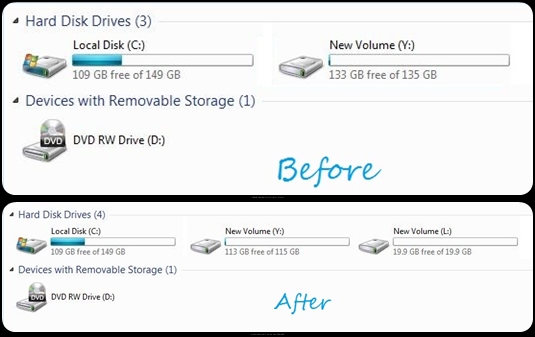
 Here, we will learn how to make a new partition on the hard disk. It is possible only if you have unallocated space on your hard disk or if there is enough space in one of your pre-partitions of hard drives to create another partition i.e shrinkage of volume is possible. You can create a new partition for the data related to your family and can hide the new partition from the other users. So, let’s start with its procedure.

Tuesday, April 23, 2013

How to delete Administrator password in 3 Steps without using Software


delete administrator password


Here we will tell you how to delete the administrator password without using any software and in just 3 steps. You can also delete the password when you have forgot it or your window  is not letting you to login into your own computer. Here are the steps :-

Wednesday, April 17, 2013

How to Hide and Unhide the Local Hard Drives in 4 Steps


how to hide and unhide the local hard drives in 4 steps

Hello friends, Today we will learn how to hide and unhide the local hard drives. Well, most of us uses different types of paid or free softwares to hide their local hard drives. If you have lots of important or valuable data which you don’t want to share with anyone then this article will help you how to hide your that particular hard drive from others for security point of view. You don’t have to purchase or to do any registration for it. Just in 4 steps, with the help of commands, you can hide as well as unhide your hard drives on your computer.

Tuesday, April 2, 2013

Computer Keyboard Shortcuts


PC keyboard shortcuts

In this article, you will come to know about various PC shortcuts which you already know and lots of PC shortcuts which i guess you don't know! I, also, don't know most of the shortcuts written below. I search it through the internet and hope you will find it useful.

Also see=> How to Make Symbols With Keyboard for Facebook

Friday, March 15, 2013

How to create a folder Locker without any software in Window 7

Today i am going to tell you how to create a folder locker without any software in window 7. People often download the softwares from the internet in order to hide their useful or private data in the computer. But you might have found that those softwares are just for 10 or 15 or maximum 30 days trial periods after which you have to buy that software. There are many guys who don't want to or who can't afford to buy the softwares from the internet. So,if you want to create a folder locker without even paying a single penny then you are at right place.
UA-31448503-1