

Friday, May 10, 2013
How to move your chatbox anywhere in facebook

Thursday, May 9, 2013
How to set password to a Folder using Winrar Software

There are various methods and softwares with the help of which you can protect your personal stuff from other users either by locking the folder or by hiding it. But most of us don't know that we can simply set password to a folder with the help of winrar software which is commonly used to compress and decompress the data and comes pre-installed in almost all of your laptops. If you don't have then you can download it from winrar. Now let's start how to set password for your folder by using this software.
Wednesday, May 8, 2013
How to make invisible folder and folder without any name

It is impossible to make a folder without any name. If you
try to make a folder without any name, it will make the folder of name New
folder. Before reading this article, just try to make a nameless folder and I
bet you won’t be able to do so. In this article, I will tell you a trick in
which you can make a nameless folder and can also make it invisible so that
nobody can see your personal stuff. In this way, you can hide your personal
data from others by making the folder invisible. So, let’s start how to do it.
Also see:- How to create a folder Locker without any software in Window 7
Also see:- How to create a folder Locker without any software in Window 7
Tuesday, May 7, 2013
How to change Windows 7 Home Basic into Genuine Windows 7 Ultimate within 10 minutes using serial key

Hello friends,Today I will tell you how to convert your old
fashioned windows home basic into upper
version of windows 7 i.e Windows Ultimate. I have just changed my home
basic window into ultimate by using a serial key which I am gonna share with
you.
Monday, May 6, 2013
How to Recover accidently deleted data or due to formatting of your computer

I am writing this article because 4 days earlier , I
mistakenly done factory reset to my computer and lost all my data i.e
pictures,documents,movies,videos,mp3 everything. There were important pics of
my family and friends which I really needed back. Then I search on the internet
and came with a software named as Recuva. This software brought me
approximately all the pics of mine which I had saved on my computer before
factory reset. I didn’t try for other things like mp3,videos,movies etc
so I am not sure about that.
Sunday, May 5, 2013
How to make a new Partition of Hard disk on your Laptop
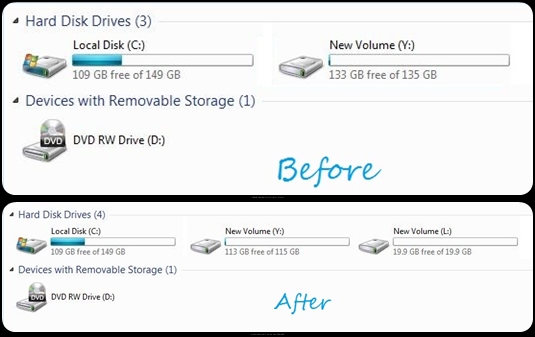
Here, we will learn
how to make a new partition on the hard disk. It is possible only if you have
unallocated space on your hard disk or if there is enough space in one of your pre-partitions
of hard drives to create another partition i.e shrinkage of volume is possible. You can create a new partition for the data related to your family and can hide the new partition from the other users. So, let’s start with its
procedure.
Subscribe to:
Posts (Atom)